Custom Dry Erase Boards Glass Dry Erase Boards
/ Glass Dry Erase Boards
Glass Dry Erase Boards
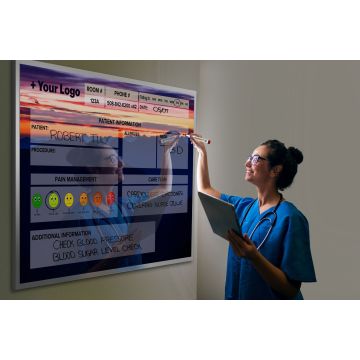

Most patient room boards don’t fail because staff reject them. They fail because the board asks people to document in a way that doesn’t match how work actually happens in the room.
That’s why custom patient communication boards tend to outperform generic layouts in day-to-day use. When the sections reflect real handoff patterns, update responsibilities, and visibility needs, the board becomes easier to maintain instead of one more surface that gets partially filled out and ignored. You’re not just choosing what information belongs on the board. You’re deciding what can be updated quickly, what needs to be seen from the doorway, and what should stay clear under constant rewriting.
If you’ve used patient room boards that became frustrating to maintain, hard to read, or inconsistent across shifts, the issue usually isn’t staff willingness. It’s that the structure was never built around the workflow. Custom printed dry erase boards give you a chance to fix that before installation, not after the unit has already adapted around a poor layout.
Communication gaps usually appear in the transition points, not in formal documentation. The board gets updated halfway during one interaction, skipped during another, and rewritten later from memory because the layout doesn’t support the sequence of work in the room.
The most common breakdown is simple: the person who has the information isn’t standing where the board is easiest to update, or the field they need is buried among less important content. That creates partial completion, inconsistent handwriting placement, and sections that look optional even when they matter operationally.
When you evaluate healthcare communication boards, look at when updates happen during the day, not just what information leadership wants displayed. A board that aligns with real room routines will be used more consistently because it reduces friction at the exact moment someone needs to write.
Staff consistency comes from layout logic more than policy reminders. If the board groups fields in a way that matches how people think and move, usage becomes more repeatable across shifts and roles.
A generic board often mixes high-frequency updates with low-frequency reference content. That forces staff to scan too much visual space just to change one item, which is why even well-intentioned teams start abbreviating, skipping, or crowding information into the nearest blank area.
A better layout separates “updated often” from “referenced often.” That distinction sounds minor, but it’s one of the main reasons custom patient communication boards feel easier to use in practice. You’re reducing decision points, which is what supports clearer, more consistent board habits.
Printed structure does more than make a board look organized. It creates visual boundaries that tell users where information belongs, what deserves emphasis, and what can stay secondary.
That matters most in rooms where multiple people need to read the board quickly from different positions. If headings are too similar, writing zones are too small, or related fields are scattered, the board becomes harder to interpret even when it’s technically complete. Clear structure supports visibility by reducing visual competition.
This is also where many teams realize they don’t need more content on the board. They need better hierarchy. Custom printed dry erase boards let you size, label, and position sections based on actual reading behavior, which is very different from filling a standard template with more boxes.
Most patient room boards need a stable core, not a long wish list. The strongest layouts usually include a small set of sections that are routinely updated and easy to verify at a glance.
In practice, that core often includes current care team identification, daily goals or priorities, schedule-related information, and a dedicated notes area with clear boundaries. The exact labels may vary by unit, but the principle stays the same: each section should have a distinct purpose and a clear update rhythm.
If a field doesn’t have an obvious owner or regular use case, it probably doesn’t belong in the permanent print. That’s one reason generic patient room boards become cluttered. They try to satisfy every possible request upfront instead of protecting the few sections that staff will actually maintain.
Patient-facing information and staff prompts should not compete for the same visual priority. When they do, the board becomes harder to read and harder to update because users are serving two audiences with one layout.
A practical approach is to separate the board into communication zones. One zone contains information intended to be easily read and understood in the room. Another contains prompts that support staff consistency, such as reminders about what to update during a routine interaction. Those prompts should guide behavior without dominating the board visually.
This is where custom patient communication boards become especially useful. If you need a patient communication board that actually fits your workflow, not a generic layout, the design has to reflect who reads each section, from where, and for what purpose. That’s a design problem, not a training problem.
Every section on the board should have an owner, even if that ownership shifts by workflow moment. Without that clarity, the board becomes a shared responsibility in the least useful sense of the phrase.
The easiest way to assign ownership is to review each field and answer three questions: who knows this information first, who is most likely to update it in the room, and who notices when it’s outdated. If those answers point to different people, the section may need to be simplified, relocated, or removed.
Ownership should also be visible in the rollout process, not necessarily printed on the board. Teams often overcomplicate this by trying to document every exception. What matters more is that each recurring section has a default updater and a clear expectation tied to a real workflow step.
Pro Tip: Before approving a final layout, mark each section as high-, medium-, or low-frequency update. If high-frequency fields aren’t the easiest areas to reach, read, and rewrite, the board will feel harder to maintain than it should.
Get Your Personalized Quote: See a free custom board design before you commit to a layout that may not fit your unit.
A pilot should test behavior, not just appearance. The goal is to learn whether the board supports actual room use under normal pressure, not whether people like the concept in a meeting.
Start by reviewing the draft layout against common update moments: shift change, bedside introductions, schedule communication, and routine room checks. Watch for hesitation points. If users pause to decide where something belongs, the layout still needs work.
This also addresses a common buyer concern: not wanting to approve a custom board until you can see exactly what you’re getting. A free design preview is valuable because it lets your team evaluate the structure before installation, when changes are still easy to make and much less disruptive.
Board training works best when it’s attached to existing routines. If you teach the board as a separate initiative, staff will treat it as an extra task instead of part of room communication.
Train by workflow moment rather than by section list. Show what gets updated during introductions, what gets confirmed during handoff, and what gets revised when the daily plan changes. That approach makes the board feel like a support tool instead of a compliance artifact.
Short, role-specific guidance is usually more useful than broad instruction. Different team members interact with patient room boards in different ways, so the training should reflect the few actions each role actually performs.
Useful feedback comes from friction, not preference. Ask where users hesitate, what gets rewritten repeatedly, and which sections are hardest to keep legible by the end of the day.
You’ll get better design input when you focus on specific behaviors. “This area is too small for routine updates” is actionable. “We don’t like the board” usually means the layout is creating unnecessary effort somewhere.
Refinement should also include maintenance experience. Many teams have been burned by boards that became frustrating to use over time, whether because writing space was too tight, sections encouraged crowding, or frequent rewriting made the board feel messy. Design choices affect that daily experience more than most buyers expect.
Blank sections are rarely a motivation problem. They usually mean the field lacks a clear purpose, appears at the wrong time in the workflow, or asks for information that changes too often to be practical in that format.
Repeated rewrites point to a different issue: the board is forcing staff to restate information instead of maintain it. That can happen when writing zones are too small, labels are too vague, or the layout doesn’t distinguish between temporary notes and stable daily information.
When you see the same sections left empty across rooms, treat that as design feedback. A board should make the right action easy enough that consistency feels natural, not forced.
Clutter reduces use because it increases visual and cognitive effort. Staff have to search longer, decide more often, and write in tighter spaces, which makes the board feel like work before the marker even touches the surface.
The problem isn’t only too many sections. It’s also weak hierarchy. If every heading is emphasized the same way, nothing stands out. If every box is similar in size, high-priority content gets buried among low-priority fields.
Healthcare communication boards work better when they are selective. A cleaner layout supports faster scanning, clearer updates, and fewer workarounds. That’s especially important if you want something staff can use clearly and consistently in patient rooms.
Reordering content helps when the board has the right sections in the wrong places. Redesign is the better move when the board’s basic logic no longer matches how the unit works.
You should consider redesign when ownership is unclear, high-use fields are hard to update, or the board keeps accumulating handwritten workarounds around the printed structure. Those are signs the board isn’t just imperfect. It’s asking users to compensate for the layout every day.
Custom printed dry erase boards are most valuable at this point because they let you rebuild the structure around actual use patterns. Instead of forcing your team to adapt to a generic format, you can align the board with the workflow you already know the unit needs.
Start with observation, not assumptions. Walk through the room routine and note when the board is updated, who updates it, and where hesitation shows up.
Then compare that behavior to the printed layout. If the board doesn’t match the sequence of work, the issue is structural. That’s the clearest signal that your current patient room boards may need a different design, not just another reminder to use them.
Your most frequently updated fields should drive the layout. If they’re buried, undersized, or mixed with rarely used content, the board will keep feeling harder to maintain than it should.
Make a simple list of the sections your team touches most often and separate them from reference-only content. That exercise alone often reveals why a generic board hasn’t held up well in daily use.
A design preview gives you something concrete to evaluate before making a decision. That matters when you need to see exactly what the board will look like and how the sections will work together before approving a custom layout.
The most useful next step is to bring your workflow, update patterns, and visibility needs into the design process. That way, your custom patient communication boards are built around real room use instead of a template that looked acceptable on paper.
If your current board is hard to maintain, inconsistent across shifts, or simply not built for how your unit works, now is the right time to review the layout before you reorder the same problem.
Get Your Personalized Quote: Request a free custom board design so you can review the layout before spending a dollar.